
Can AI Change an Image Without Changing the Face?
Yes. AI can change almost everything in an image while keeping the face recognizable — this is called identity preservation or face preservation. Identity preservation locks a subject's facial geometry, eye spacing, skin tone, and expression while regenerating the surrounding attire, background, lighting, or artistic medium.
Upload Source Image
Background & Relight (0.2)
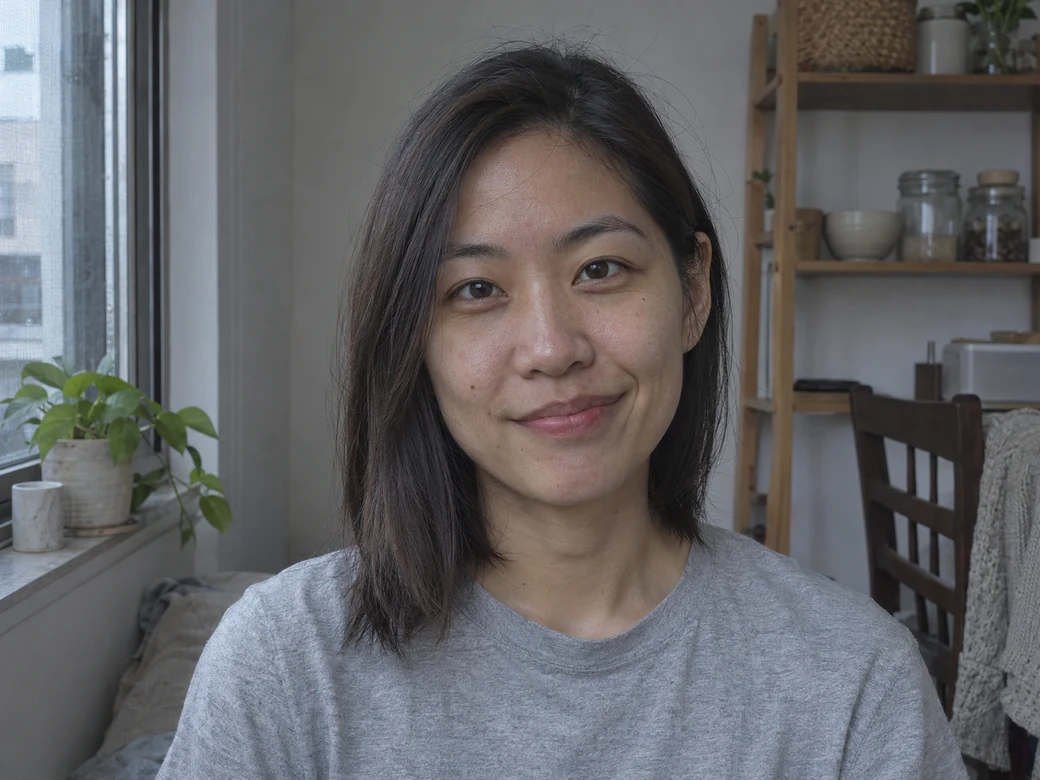
0.2 locks ~80% of source pixels — ideal for lighting tweaks, face cleanup & subtle texture polish.
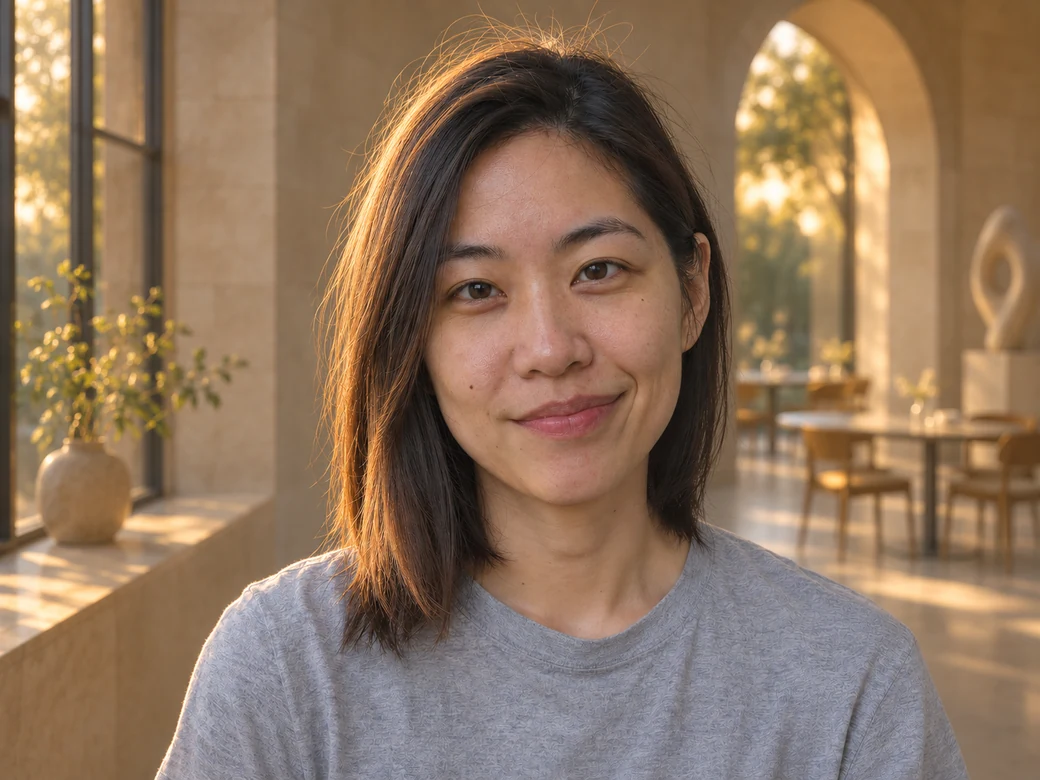
Whether you use a dedicated ai photo editor without changing face, a low-denoising img2img pass, or a masked generative fill tool, the difference between a faithful edit and an uncanny look-alike comes down to how strictly the model isolates facial pixels.
Test Face-Preserving Edits Live
Upload a clear portrait and run low-strength img2img (0.2–0.4) to restyle lighting, background, or attire with 2 free watermark-free 1K runs per day.
Free Face-Lock Prompt + 3 Variants
Copy our tested English identity-preservation prompt for ChatGPT, Gemini, or browser img2img editors, with ready-to-paste templates for formal wear, backgrounds, and art styles.
Compare Face-Lock Mechanisms
See how Image to Image AI, Adobe Photoshop, Adobe Firefly, ChatGPT Images, and Google Gemini differ on masking, free quotas, and paid entry pricing.
Identity Preservation
Locks eye spacing, jawline, and skin tone while editing surroundings.
Copy-Ready Prompts
One master prompt plus 3 scenario templates for chat and img2img tools.
2 Free 1K Runs / Day
Test face-safe portrait edits in your browser with no account required.
Honest Pixel Limits
Clear breakdown of when prompts work and when manual masking is required.
What AI Can Change Safely vs What Often Breaks
Modern reference-conditioned models handle broad scene and styling changes reliably, while fine high-frequency details near the face still drift unless masked.
Reliable Changes (Face Stays Recognizable)
- Outfits, outerwear, and formal attire — swapping a casual hoodie for a tailored blazer, jacket, or studio shirt while keeping head proportions aligned.
- Backgrounds and locations — moving a portrait from a cluttered room to a sunlit office, studio backdrop, or outdoor street with matching edge lighting.
- Hairstyles, hair color, and lighting direction — adjusting hair volume, color tone, or upgrading flat indoor light to golden-hour rim light.
- Artistic styles, color grading, and framing — converting a photograph into an editorial sketch, film still, or wider crop while keeping the likeness recognizable.
Prone to Drift (Breaks Easily Without Masking)
- Subtle facial micro-expressions — slight shifts in eye gaze, eyelid crease, smile asymmetry, or tooth alignment during full-frame regeneration.
- Small text, badges, and logos — tiny embroidered crests, shirt lettering, or jewelry engravings frequently warp into unreadable glyphs.
- Hands and fingers near the face — resting a chin on a hand or adjusting glasses often merges fingers with cheek contours.
- Heavy occlusions and harsh glare — thick eyeglass reflections, sunglasses, microphones, or deep half-face shadows force the model to guess hidden skin.
Free Face-Preservation Prompt (Copy & Paste)
Paste this master prompt into ChatGPT Images, Google Gemini, or any reference-based ai photo editor without changing face. Replace only the bracketed edit instruction.
Edit this photo while keeping the person's exact facial identity, bone structure, eye shape, nose, mouth, skin texture, and natural expression 100% unchanged. Do not redraw, smooth, age, or beautify the face. Preserve the original head angle, gaze direction, and natural lighting across the face. Only change [describe your edit here, e.g., the outfit to a tailored navy blazer over a white shirt and the background to a clean sunlit office], matching the original camera angle, focal length, and shadows seamlessly.3 Ready-to-Use Scenario Variants
Upgrade to Formal Headshot Attire
Keep the person's exact face, facial landmarks, expression, skin texture, and hair completely unchanged — do not redraw or retouch the face. Replace only the casual top with a tailored dark charcoal blazer over a crisp white collared shirt. Match the original studio lighting and shoulder angle naturally.
Replace Background & Relight Scene
Preserve the subject's exact facial identity, eyes, mouth, hair strands, and head tilt without altering any facial features. Replace only the cluttered background with a softly blurred modern architectural interior in warm daylight, adding realistic rim light along the shoulders and hair edges.
Restyle Medium While Keeping Likeness
Transform this portrait into a refined editorial pencil-and-wash illustration while strictly preserving the subject's recognizable facial proportions, eye spacing, nose bridge, and expression. Do not invent a generic face; keep every defining facial landmark faithful to the reference photo.
How to Edit a Photo Without Changing the Face in 3 Steps
A repeatable 3-step workflow to keep the face the same and prevent drift on your first generation. Start with Denoising Strength 0.2 or 0.4 below to keep ~65%–85% of the original facial geometry locked while testing lighting, attire, or backdrop changes.
Upload a Sharp, Evenly Lit Portrait
Choose a front-facing or three-quarter photo where both eyes, jawline, and hair edges are clearly visible without heavy shadows or motion blur.
Set Low Strength (0.2–0.4) & Paste the Prompt
Leave Aspect Ratio on Auto so the face is never cropped or rescaled, paste the identity-lock prompt, and specify only the one region you want changed.
Compare Close-Up & Download Cleanly
Inspect eyes, nose bridge, and mouth with the before/after slider before exporting your watermark-free 1K image — or upscale to 4K when you need print clarity.
5 AI Photo Editor Without Changing Face Tools Compared
Not every editor protects facial pixels the same way. Below is an objective comparison of five widely used tools — including our browser image to image AI workbench — ranked by input control, face-lock mechanism, free daily/monthly quota, and starting paid price.
| Tool | Input Method | Face-Lock Mechanism | Free Quota | Paid Pricing |
|---|---|---|---|---|
01Image to Image AI Best for quick browser edits with strength control | Reference photo + prompt + strength (0.2–1.0) | Identity-conditioned img2img at 0.2–0.4 strength + Auto ratio lock | 2 free 1K edits/day, no login, no watermark | From $9.90 credit packs or $9.90/mo |
02Adobe Photoshop (Generative Fill) Best for 100% untouched pixel-exact faces | Manual lasso / brush selection mask + text prompt | Strict pixel mask — unmasked face pixels are never regenerated | 7-day free trial only (card required) | $22.99/mo (Creative Cloud Single App) |
03Adobe Firefly (Web) Best lightweight browser masking | Web brush mask (Generative Fill) + text prompt | Masked inpainting keeps brushed-out face untouched | 25 free generative credits/month | $4.99/mo (Firefly Standard) |
04ChatGPT Images (GPT Image) Best for conversational single-pass edits | Chat photo upload + natural-language prompt | Prompt-guided full-image regeneration (no hard pixel mask) | Limited free daily image generations | $20/mo (ChatGPT Plus) |
05Google Gemini (Imagen / Nano Banana) Best for fast mobile/chat iterations | Chat upload + conversational edit prompt | Multimodal reference conditioning (subtle drift on multi-turn edits) | Free tier with daily generation cap | $19.99/mo (Google AI Pro) |
Honest Limitations: Why No Prompt Guarantees 100% Face Consistency
No text prompt — no matter how strict the wording — can guarantee 100% pixel-identical facial consistency when an AI model regenerates an entire frame from scratch.
Conversational models like ChatGPT and Gemini decode the entire image through a neural autoencoder every time you ask for an edit. Even when the prompt says 'do not change the face,' tiny shifts in eye spacing, skin pores, or smile symmetry accumulate — especially if you chain three or four follow-up edits in the same thread. For step-by-step prompting tips, read how to restyle photos while keeping faces consistent.
The Most Reliable Workaround: Mask the Face & Edit Only the Selection
When zero facial drift is non-negotiable (passports, corporate headshots, or client deliverables), mask the face and invert the selection in Photoshop or Firefly Generative Fill so the model only paints outside the mask. In browser img2img workflows, keep denoising strength between 0.2 and 0.4 and always restart from your original source photo instead of editing an AI output twice.
- Restart from the original photo for every new edit — never chain 3–4 consecutive AI outputs.
- Use a mask whenever exact pixel fidelity matters more than full-scene lighting cohesion.
- Avoid asking for 'beautify', 'cinematic face', or 'HDR portrait' — those words trigger facial redraws.
Before and After: Real Face-Preservation Tests
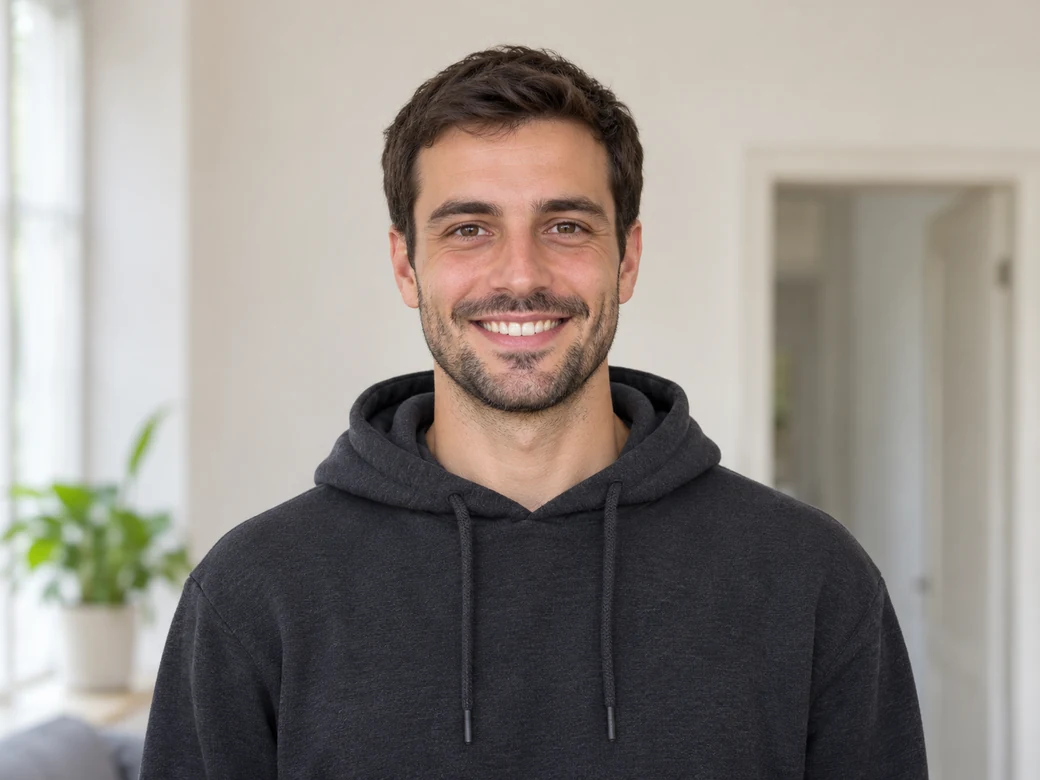
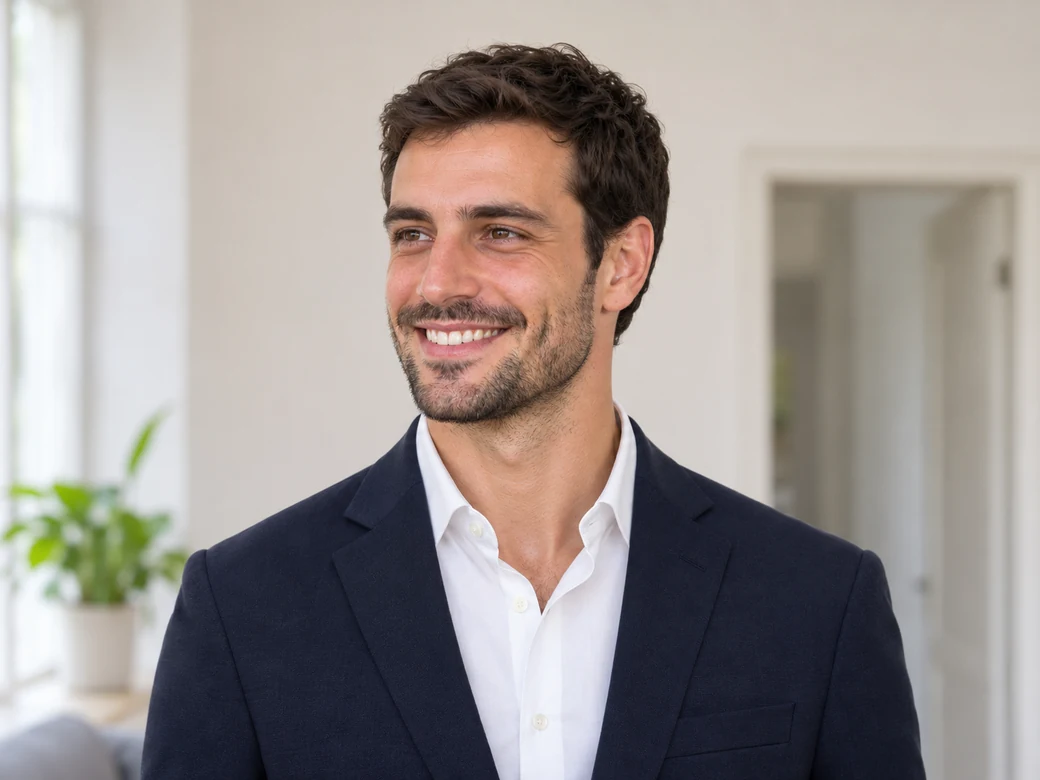
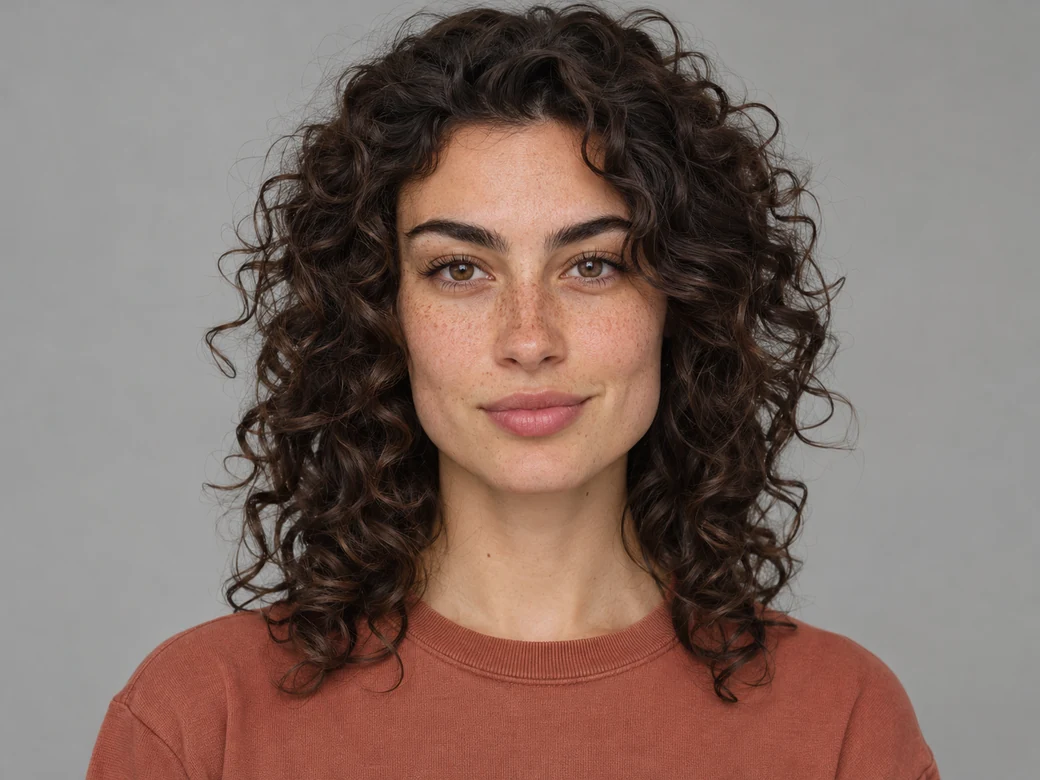
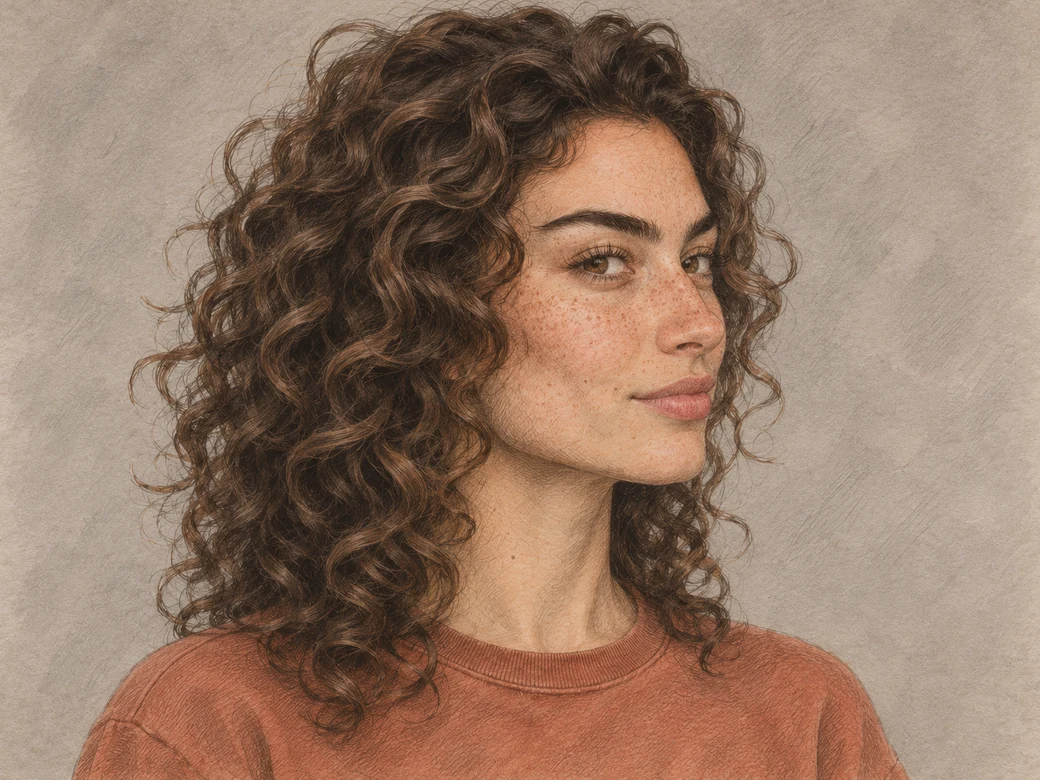
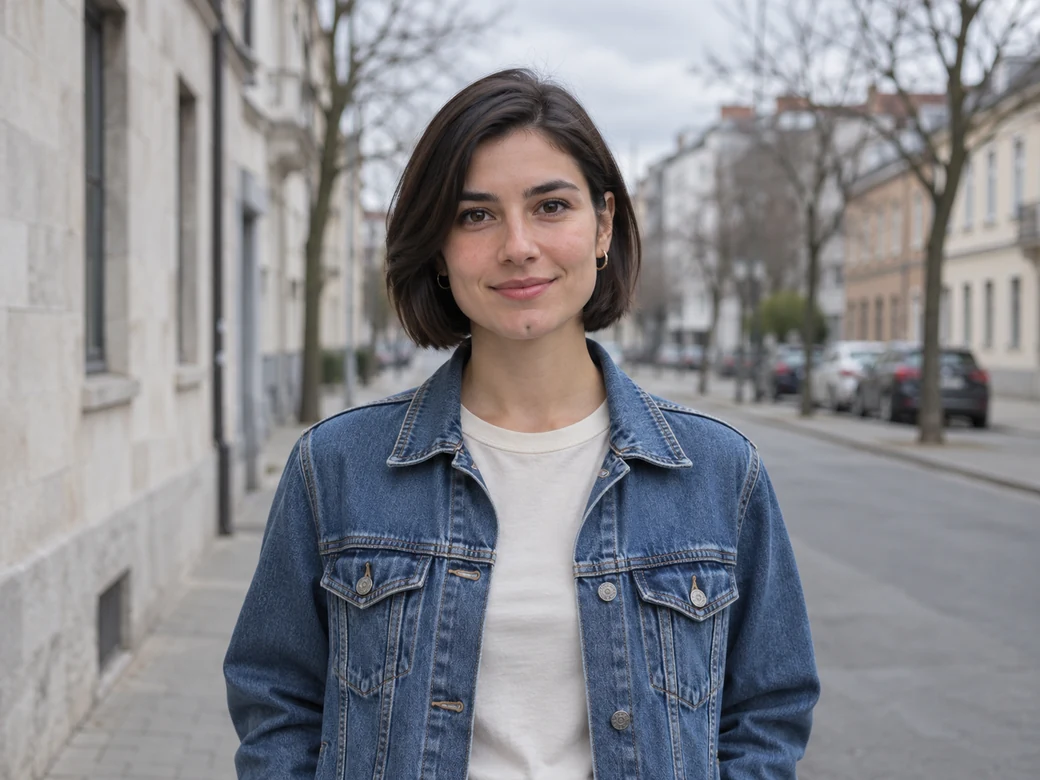
Compare each original front-facing photo side by side with its angled after edit to verify which facial landmarks stay recognizable even after a head turn.
Background & Lighting Swap
She moves from a dim indoor window into a sunlit gallery, turning her head to the right while glancing back at the camera. Sunlight rims her hair while the cheek mole and slightly asymmetric smile remain unmistakable.
BEFORE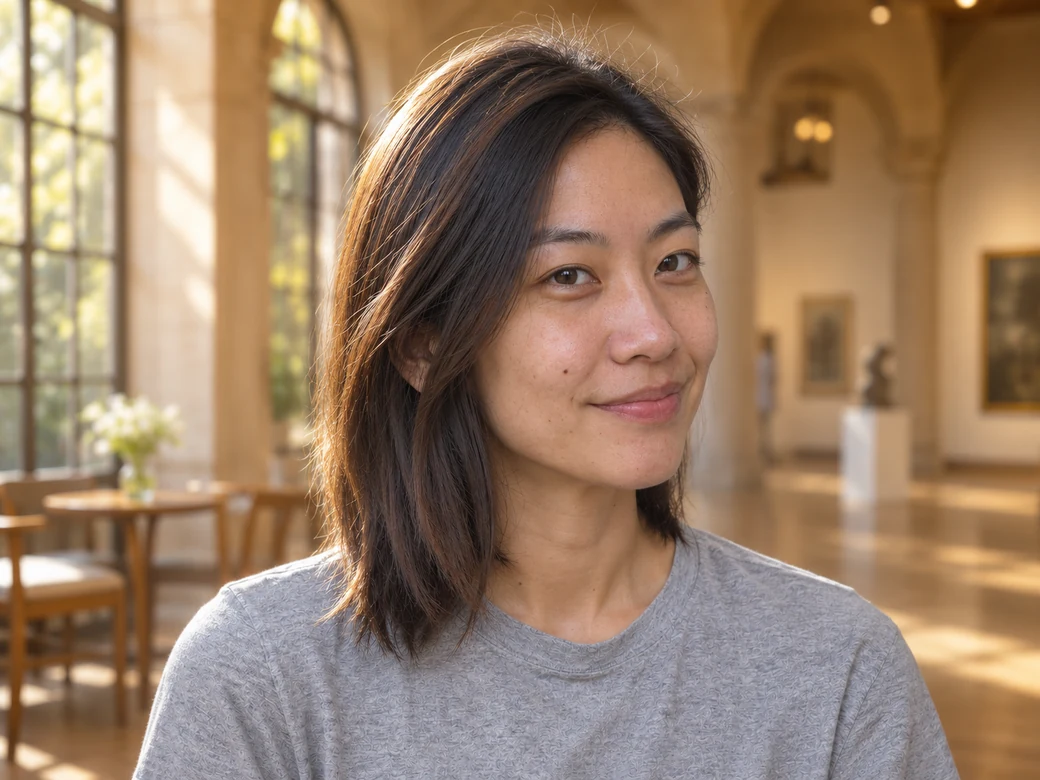 AFTER
Casual Hoodie to Formal Business Attire
He switches into a navy blazer and crisp white shirt with shoulders facing forward and his face turned slightly left. The doorframe and indoor plants stay in place so you can compare his brows, toothy smile, and stubble contour directly.
 BEFORE
 AFTER
Studio Portrait to Pencil-and-Wash Illustration
A front-facing studio portrait becomes a three-quarter illustration turned to the right. Pencil hatching defines the curls and jawline while transparent washes keep her nose freckles, full eyebrows, and lip shape clearly recognizable.
 BEFORE
 AFTER
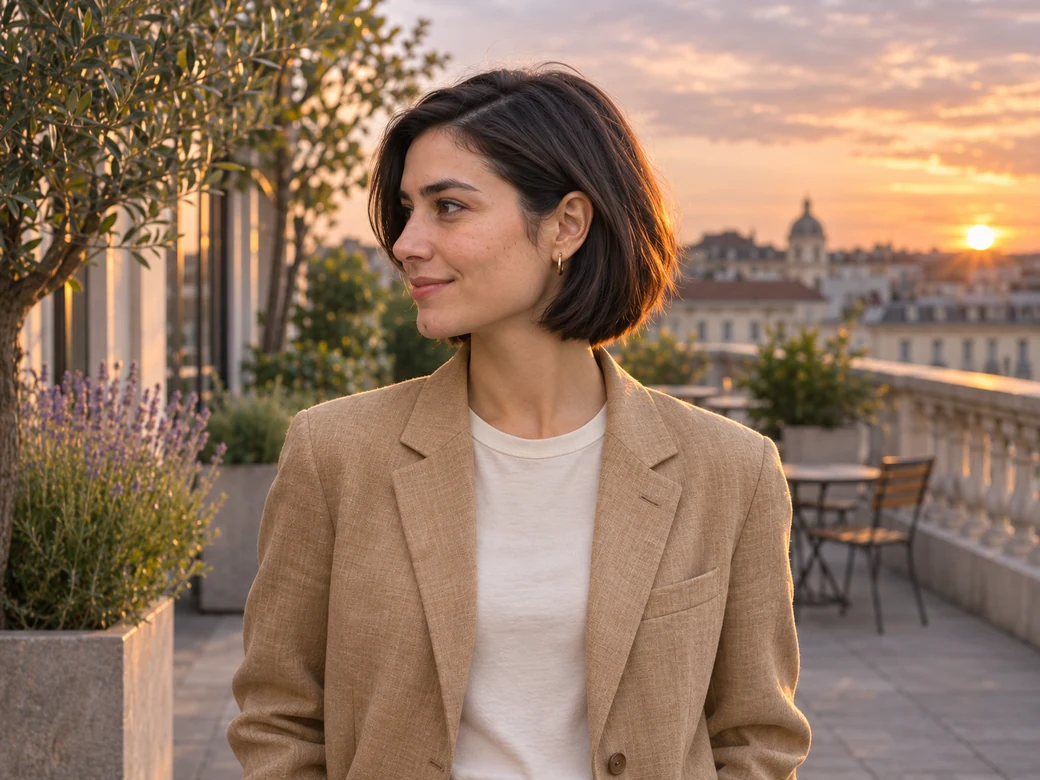
Overcast Street to Sunset Terrace
She shifts from a denim jacket facing the lens to a warm-sand linen blazer looking off to the left on a sunset terrace. Even with the widest head turn, her side-parted short hair, small gold earrings, and subtle chin dimple carry over cleanly.
 BEFORE
 AFTER
Frequently Asked Questions
Direct answers to the most common questions about keeping faces unchanged in ChatGPT, Gemini, and browser AI editors.