
Which AI Image Generator Supports Multiple Reference Images?
 Image to Image AI Team
Leonardo (6), Midjourney (4), and Firefly (6) compared: how multiple reference images work in each tool, verified against official docs on 2026-11-21.
Leonardo AI supports up to 6 reference inputs, Midjourney supports up to 4 through its V8.1/V8.2 Edit Model, and Adobe Firefly supports up to 6 in its multi-reference workflows. Exact caps depend on the model you select, and every figure below was verified against official documentation on 2026-11-21.
Below, we compare how multiple reference images work across the leading generators, where each platform breaks down, and how to write a reliable six-input prompt.
What You Can Control With Multiple Reference Images
Assigning each visual dimension to a concrete file removes guesswork:
- Face: Lock bone structure, skin tone, and likeness so the same person stays recognizable across frames.
- Outfit: Transfer exact fabric drape, collar cuts, and colorways from a garment photo onto a model.
- Pose: Dictate posture, hand placement, and camera angle without fighting anatomical drift.
- Style: Carry over film grain, brushwork, color grade, and editorial lighting from a moodboard shot.
- Composition: Anchor subject scale, framing, and negative space for banners or catalog layouts.
- Background: Place your subject inside a specific room, street, or architectural set with matching perspective.
Four Criteria Before Picking a Tool
Before spending credits on any tool supporting multiple reference images, check four criteria:
- Maximum slot count: Whether a model accepts 2, 4, or 6 uploads determines if you finish in one pass or chain edits.
- Per-image role assignment: Stronger interfaces let you tag each file as face, style, structure, or pose rather than blending everything blindly.
- Natural-language instructions: Modern edit models understand plain sentences like "put the blazer from Image 2 on the person in Image 1."
- Character fidelity across angles: Verify likeness holds when the subject turns three-quarters or enters directional light.
Tool-by-Tool Breakdown (Verified 2026-11-21)
Leonardo AI — Up to 6 Reference Images
Leonardo AI serves illustrators, game teams, and commercial designers who want granular ControlNet-style steering. Through Image Guidance, Leonardo supports up to 6 reference images simultaneously depending on the active model preset (verified against the Leonardo AI Image Guidance docs on 2026-11-21).
Open Image Creation, click Image Guidance beside the prompt bar, upload your multiple reference images, and assign roles such as Character, Style, Content, or Pose with strength sliders. The main limitation is checkpoint fragmentation: not every model exposes all six slots, and stacking high weights over-processes contrast. Leonardo includes a free tier with daily regenerating tokens, though multi-guidance runs spend tokens faster.
Midjourney — Up to 4 Reference Images (V8.1/V8.2 Edit Model)
Midjourney leads on photographic texture, lighting cohesion, and editorial polish. In the V8.1 and V8.2 Edit Model, Midjourney natively supports up to 4 reference images per prompt (verified against the Midjourney Edit Model docs on 2026-11-21). Note the version split: legacy V7 Omni Reference (--oref) only supports 1 image (see the Midjourney Omni Reference docs); workflows using multiple reference images require the V8.1/V8.2 Edit Model.
On the web app, click the image icon in the Imagine bar, drag up to four files into Attach to prompt, and pair them with natural-language edits or --sref style codes. Limitations include no Remix or --tile support in the Edit Model and strict moderation on real faces. Midjourney offers no permanent free tier.
Adobe Firefly — Up to 6 Reference Images
Adobe Firefly targets brand teams that need commercially safe training data and smooth Photoshop handoffs. In Firefly Image 5 and integrated partner-model workflows, Firefly accepts up to 6 reference images to guide subject, layout, and aesthetic direction, while standard Text to Image uses dedicated Style and Composition slots (verified against the Adobe Firefly Help Center on 2026-11-21).
Upload your multiple reference images in Generate Image, dial visual intensity sliders, and specify how elements merge in the prompt box. The main trade-off is stylistic caution: Firefly can look overly conservative on edgy fashion or stylized art compared with Midjourney. Adobe offers a free tier with monthly free generative credits.
Side-by-Side Comparison Table
| Tool | Max Reference Images | Best For | Key Limitation | Free Tier |
|---|---|---|---|---|
| Leonardo AI | Up to 6 (model-dependent) | Role-tagged ControlNet control, game art, character + product scenes | Slot count varies by checkpoint; high weights can look over-processed | Yes — daily regenerating free tokens |
| Midjourney | Up to 4 (V8.1/V8.2 Edit Model; V7 Omni Reference = 1) | Editorial photography, realistic lighting, cohesive multi-object scenes | No permanent free plan; Edit Model skips Remix and --tile | No — paid subscription required |
| Adobe Firefly | Up to 6 (Image 5 / multi-reference; 1 Style + 1 Composition in Text to Image) | Brand-safe commercial assets and Photoshop round-tripping | Conservative aesthetic on stylized art; slot UI shifts by model | Yes — monthly free generative credits |
| Image to Image AI | 2 (1 source image + 1 reference image) | Fast browser photo restyling, outfit swaps, and sketch-to-photo edits | Two-slot cap; 3+ inputs require combining references into a grid image first | Yes — starter credits on sign-up |
6-Reference-Image Walkthrough & Copyable Prompt
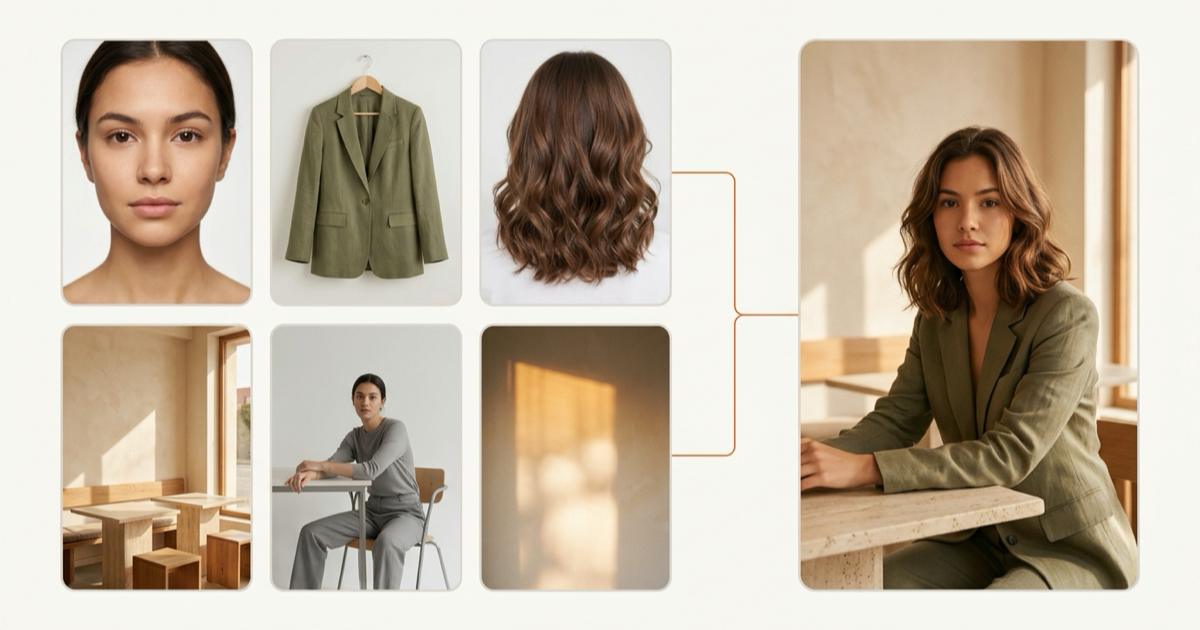
In a six-slot workspace, give each upload one clear job:
- Image 1 (Face): Evenly lit front-facing portrait.
- Image 2 (Outfit): Tailored olive-green linen blazer and knit top.
- Image 3 (Hairstyle): Shoulder-length wavy chestnut hair.
- Image 4 (Background): Sunlit minimalist travertine cafe interior.
- Image 5 (Pose): Relaxed seated three-quarter posture at a cafe table.
- Image 6 (Style): Warm 35mm film color grade with soft window rim light.
Copy and adapt this prompt verbatim:
Create a natural editorial portrait that preserves the facial identity from Image 1, wears the olive linen blazer and top from Image 2, applies the wavy hairstyle from Image 3, and follows the sunlit cafe environment from Image 4, the relaxed seated pose from Image 5, and the warm 35mm film lighting and color palette from Image 6. Natural skin texture, realistic fabric folds, no extra accessories.
Three Practical Workflows
1. Face-Preserving Outfit Swap
- Tools: Leonardo AI, Midjourney V8.1/V8.2 Edit Model, or our dedicated AI clothes changer for quick two-image swaps.
- Prompt: "Preserve the exact face, hair, and background from Image 1; replace only the top with the tailored trench coat from Image 2, matching natural shoulder drape and ambient light."
2. Multi-Image Scene Compositing
- Tools: Midjourney V8.1/V8.2 Edit Model (4 slots) or Leonardo AI (6 slots). Starting from a hand-drawn layout? Convert it first with sketch to photo.
- Prompt: "Combine the person from Image 1 holding the ceramic bottle from Image 2 on the kitchen counter from Image 3 under the morning daylight of Image 4."
3. Controlled Style Transfer
- Tools: Adobe Firefly, Midjourney (
--sref+ Edit Model), or any focused AI image generator with reference image support like our img2img studio. - Prompt: "Keep the exact framing and architecture from Image 1 while re-rendering brushwork, palette, and lighting strictly in the gouache editorial style of Image 2."
Real Limitations and Common Pitfalls
Every generator handling multiple reference images shares four caveats:
- Limits shift with each model release: A flagship model may allow six slots while a faster checkpoint quietly drops to one or two.
- Overflow uploads get silently ignored: Exceeding the active cap often discards trailing images or zeroes their weights without an error.
- Conflicting references compete for priority: Pairing a front-flash portrait with a dark backlit pose forces a clash—structural cues usually override subtle lighting cues.
- A source image is not a reference image: A source image defines the base canvas being edited in place; a reference image supplies detached visual traits for a fresh composition.
Using Multiple Reference Images on Image to Image AI (2-Slot Workflow)
On Image to Image AI, our img2img workspace uses 2 slots: 1 source image plus 1 reference image in the Reference panel. We state that 2-image cap honestly because overstating limits wastes your time once you open the studio.
For single-subject restyling or outfit swaps, two slots run faster with fewer weight conflicts. When you need more than two cues, stitch your extra items into a single clean grid image first, upload your subject as the source photo, and drop the grid into the Reference slot with a short prompt naming each element. Check high-resolution export tiers on our pricing page.
Frequently Asked Questions
Which AI image generator supports multiple reference images?
Leonardo AI supports up to 6 inputs via Image Guidance, Adobe Firefly supports up to 6 in multi-reference workflows, and Midjourney supports up to 4 in the V8.1/V8.2 Edit Model. Image to Image AI supports 2 slots (1 source + 1 reference).
Can I upload multiple reference images at once?
Yes. Leonardo AI, Midjourney V8.1/V8.2 Edit Model, and Adobe Firefly accept several files in one prompt. On two-slot tools, combining extra cues into a grid image lets you feed them together.
Does Midjourney support multiple reference images?
Yes—in the V8.1/V8.2 Edit Model (up to 4 images). Legacy V7 Omni Reference (--oref) supports only 1 image per job.
Is there a free AI image generator with multiple reference images?
Leonardo AI gives daily free tokens, Adobe Firefly provides monthly free credits, and Image to Image AI offers starter credits on sign-up. Midjourney has no permanent free tier.
What's the difference between an image prompt and a reference image?
An image prompt blends broad colors and shapes loosely; a reference image locks a specific attribute—face, pose, outfit, or style—with clear boundaries.
Can an AI image generator with reference image support keep the same face across outfits?
Yes. An AI image generator with reference image locking keeps facial features steady across outfits when you supply a sharp portrait and instruct the model to preserve identity.
What happens if I upload more reference images than a model supports?
Extra files are blocked by the UI or silently ignored during inference, and overcrowded slots dilute adherence to your primary subject.
Related reading: How to Restyle Photos While Keeping Faces & Pose Consistent · E-Commerce Product Photo Editing with Image to Image AI · GPT Image 2.6 GIF: How to Generate and Loop Animated GIFs
Limits change with each model release. Last verified 2026-11-21 against each vendor's help center.